Live interactive build showroom
Six live websites. Scroll and test every one.
Each one is built to turn a first look into a booked job or an order. Watch a house go from studs to a kitchen, a backyard turn into a pool, or walk into a restaurant, then try the real site on desktop or phone.
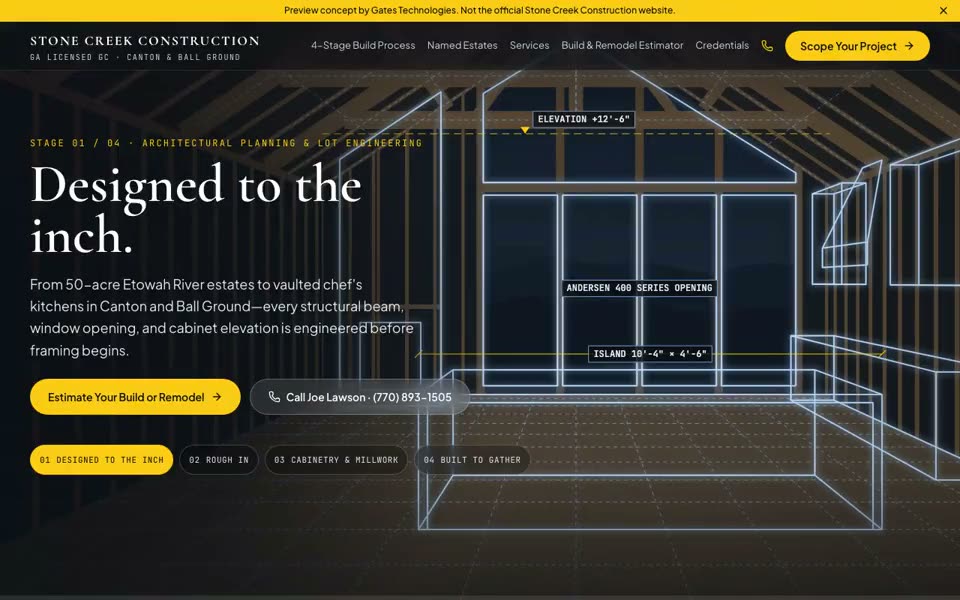
Custom home builder· Ball Ground, GA
- A great room goes from studs to finished kitchen as you scroll
- Build and remodel estimator with planning ranges
- Consultation request that goes straight to the owner
Interactive build theater
Six real sites. Try one right here.
Pick a build and scroll the live site in desktop or phone view. Each one is a spec build made to show an owner what their site could do.
Concept preview · Built by Gates Technologies
01 / Hook
A great room goes from studs to finished kitchen as you scroll
02 / Interaction
Build and remodel estimator with planning ranges
03 / Conversion
Consultation request that goes straight to the owner
Want a site like Stone Creek Construction built for your business?
Book a 15-min walkthroughThe first look
Buyers decide from a phone screen.
They check you on their phone first
Before someone calls a builder, picks a shop or chooses dinner, they look you up. That look takes a few seconds.
Photos all start to look the same
A grid of finished kitchens, pools or plates reads like every other business nearby. It does not show what working with you is like.
No next step means no call
When the page has no way to price the job, book a visit or order, people leave to find a business that answered the question.
What’s included
What’s built into every site.
01
A scroll reveal or walk-in
Studs to a finished room, a dig to a full pool, a bay door rolling up, or a walk through your front door.
02
An estimator or order builder
Buyers ballpark their project or build their order right on the page, before they ever call.
03
Booking and ordering
Buttons to the calendar, Toast, DoorDash or shop scheduler you already use. Nothing new for your staff to learn.
04
Missed-call text-back
When you are on a job or in the kitchen, callers you miss get a text back with your booking link.
05
Review cards and Google Maps
Tap cards and review requests that send happy customers to your Google listing.
06
Built for phones, kept current
A still image loads first and motion respects phone settings. Each month we keep hours, menus and links right.
How it works
From the first call to a live site, in seven steps.
- 01
Intake
Your services or menu, hours, links and look. We get written permission before we film anything.
- 02
The shoot
We film or render the scroll scene: your job site, your yard, your bay or your front door.
- 03
Cleanup
Any person, face or plate in the shot is removed or blurred. You see every frame before it goes anywhere.
- 04
The build
Your site, in your colors and type, written in plain words.
- 05
Checks
Tested on iPhone and Android screens, with motion off, and on a slow connection.
- 06
Review cards
Tap cards that open your Google review form, tested and locked.
- 07
Launch and care
Your domain goes live. Each month we confirm hours, menu, links and cards.
Nothing goes live until you approve the preview.
Review cards
A tap opens your Google review form.
Tap cards for the counter, the table or the job-site handoff. A customer who wants to leave a review taps their phone on the card and lands on your Google listing’s review form.
Kept inside Google’s rules
- Neutral wording. No stars, prizes or discounts on the card.
- Every customer gets the same link. No filter before Google.
- No staff names, counts or contests.
- The link runs through a redirect we control, so a moved listing never means reprinting cards.
Who it’s for
Built for businesses where the work wins the customer.
A good fit
- Custom home builders, remodelers and pool contractors across Georgia
- Restaurants, street-food spots, lounges and hospitality venues in Metro Atlanta
- Performance auto shops, detailers and other high-ticket local services
Not a fit
- Anyone who needs online ordering built from scratch (we link to yours)
- A business that cannot share photos or allow filming on site
- Someone shopping for the lowest number
FAQ
Questions owners ask.
Who films it?
We do, at a time you pick. Some scenes are rendered from your project photos instead. We get your written permission first.
What if customers or staff end up in the shot?
We remove or blur every person, face and license plate, and you review every frame before anything goes live.
Will it be slow on phones?
No. A still image shows first, the motion loads in the background, and phones with motion turned off get a single still instead.
We sell age-restricted products. Does that change anything?
Smoke shop and lounge sites get a 21+ enter or exit screen right after the doors open.
Who updates the menu, services and hours?
We do, as part of care. Send us the change and we put it up.
What does it cost?
We give you the numbers on the call, once we know your business and what you need.
Book
Walk us through your business.
One call. We talk through your business, your buyers and what your site would show them. If it is not a fit, we will say so. Numbers on the call.